
What is on the face #
- Weekday in capitals — MONDAY.
- The time in large digits, with smaller seconds beside them. Seconds are always shown. AM/PM appears only in 12-hour mode.
- The date — 02 AUG 2026.
- The Hijri date underneath, if Show Hijri date on clock is on (it is by default).
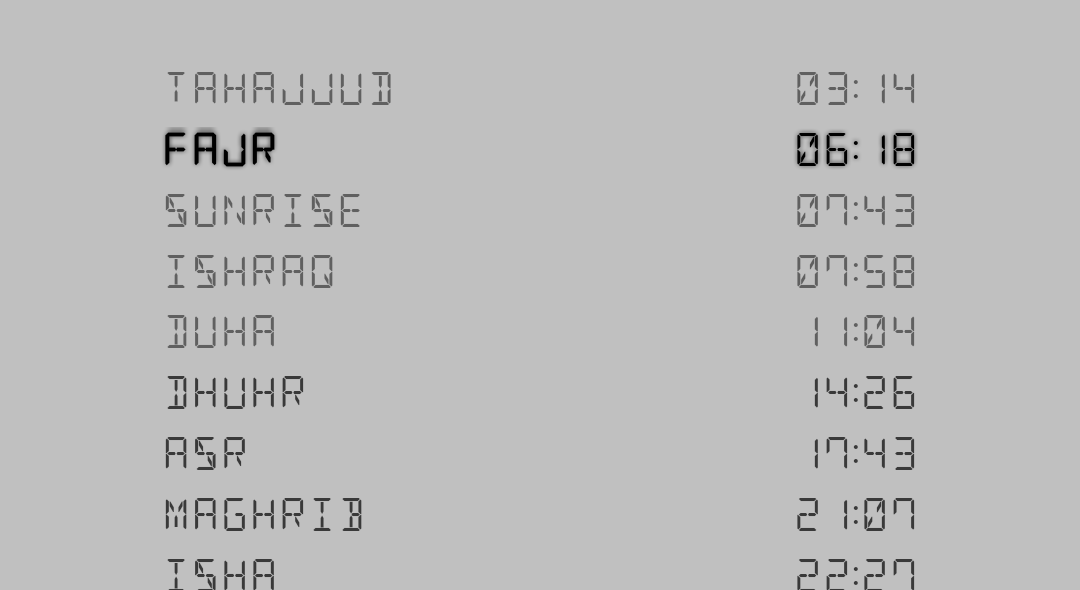
- The prayer board, if prayer times are enabled.
The prayer board #
Below the date, Chimely lists the five daily prayers — plus any optional times you have switched on — in chronological order, name on the left and time on the right. The prayer period you are currently in is drawn brightest and bold; the others are dimmed, and any prayer you have turned off is dimmed further still. Your location name and its coordinates sit at the bottom.
The status icons #
The small icons in the top-left corner are a live summary of your chime settings — they are the fastest way to check what Chimely is set to do without opening Settings.

| Icon | Meaning |
|---|---|
| Bell | Chimes are on. A bell with a line through it means they are off. |
| Numbered list / music note / equaliser / audio note | Your chime style — Count dings, Westminster melody, Distinct tones, or Custom sound. |
| Small timer dial | Appears only when Strike the hour is on. |
| Sun / moon / infinity / clock | Your chime schedule — Day, Night, All day, or a Custom window. |
Moving to the other screens #
The clock face itself is not tappable — everything is reached from the four buttons in the top-right corner:
| Button | Opens |
|---|---|
| Detect location | Re-reads your position and refreshes prayer times. |
| Prayer calendar | The month timetable. |
| Qibla compass | The live compass. Hidden if your phone has no compass sensor. |
| Settings | Chimes, Appearance, Widgets, Prayer and Troubleshooting. |
Banners along the bottom #
CHIMES OFF appears near the bottom of the clock whenever quarter-hour chimes are disabled — a standing reminder that the app is silent by choice.

A separate banner — “Some chimes or azan were missed — your phone is stopping Chimely in the background” — appears if Chimely detects it was killed. Fix jumps straight to Troubleshooting; Dismiss hides it. Do not ignore it; see Reliability.
Pressing the back button once shows PRESS BACK AGAIN TO EXIT, so the clock is not closed by accident.